Deploy Keys
For AI agents: see llms.txt for the complete documentation index. Markdown versions are available by adding .md to a page URL or requesting Accept: text/markdown.
When you can't log in or use the CLI interactively to specify a project or
deployment, for example in a production build environment, the environment
variable CONVEX_DEPLOY_KEY can be set to a deploy key to make convex CLI
commands run non-interactively.
Deploy keys identify a deployment, project, or team; confer permission to take certain actions with those resources; and can change the behavior of the convex CLI.
Developing locally does not require a deploy key
Running npx convex dev on a new machine offers the choice to log in or run
Convex locally without an account.
Logging in stores a user token at ~/.convex/config.json which is used
automatically for all CLI use going forward on that machine. This token grants
permission to push code to and read/write data from any deployment this user has
access to.
Using Convex locally without logging in
(anonymous development)
creates a deployment locally and records this preference for this project in the
.env.local file in the project directory. The admin key for this anonymous
backend is stored in ~/.convex/anonymous-convex-backend-state/ along with its
serialized data.
In either of these cases, there's no reason to set CONVEX_DEPLOY_KEY.
How to set a deploy key
Generally deploys keys are set in a dashboard of the service that needs the key but in most shells you can set it right before the command, like
CONVEX_DEPLOY_KEY='key goes here' npx convex dev
or export it before you run the command
export CONVEX_DEPLOY_KEY='key goes here'
npx convex dev
or add it to your .env.local file where it will be found by npx convex when
run in that directory.
Common uses of deploy keys
Deploying from build pipelines
A production deploy key specifies the production deployment of a project and grants permissions to deploy code to it.
prod:qualified-jaguar-123|eyJ2...0=
You can deploying code from a build pipeline where you can't log in (e.g. Vercel, Netlify, Cloudflare build pipelines)
Read more about deploying to production.
Deploying to preview deployments
A preview deploy key looks like this:
preview:team-slug:project-slug|eyJ2...0=
Use a preview deploy key to change the behavior of a normal npx convex deploy
command to deploy to a preview branch.
Read more about preview deployments.
Admin keys
An admin key provides complete control over a deployment.
An admin key might look like
bold-hyena-681|01c2...c09c
Unlike other types of deploy key, an admin key does not require a network connection to https://convex.dev to be used since it's a irrevocable secret baked into the deployment when created.
These keys are used to control anonymous Convex deployments locally without logging in, but rarely need to be set explicitly.
Setting CONVEX_DEPLOY_KEY to one will cause the Convex CLI to run against that
deployment instead of offering a choice.
Rarer types of deploy keys
Project tokens
A project token grants total control over a project to a convex CLI and carries with it the permission to create and use development and production deployments in that project.
project:team-slug:project-slug|eyJ2...0=
Project tokens are obtained when a user grants an permission to use a project to an organization via an Convex OAuth application. Actions made with the token are on behalf of the user so if a user loses access to a project the token no longer grant access to it.
Development deploy keys
A dev deploy key might be used to provide an agent full access to a single deployment for development.
dev:joyful-jaguar-123|eyJ2...0=
This can help limit the blast radius when developing with an agent.
To give an agent exclusive access to its own dev deployment, see Agent Mode.
Creating and deleting deploy keys
You can create and delete deploy keys for any cloud deployment you have access to from either the dashboard or the CLI.
From the dashboard
Open the deployment settings page for the deployment you want a key for. In the Deploy keys section, click Generate a deploy key to open the deploy key creation panel.
Give the key a memorable name and choose which actions it's allowed to perform.
For a CI/CD pipeline that runs npx convex deploy, enable the
deployment:deploy permission. For CLI usage or AI agents, you may want to
grant more permissions, such as viewing logs and reading/writing data or
environment variables. See
Role Actions for the
full list.
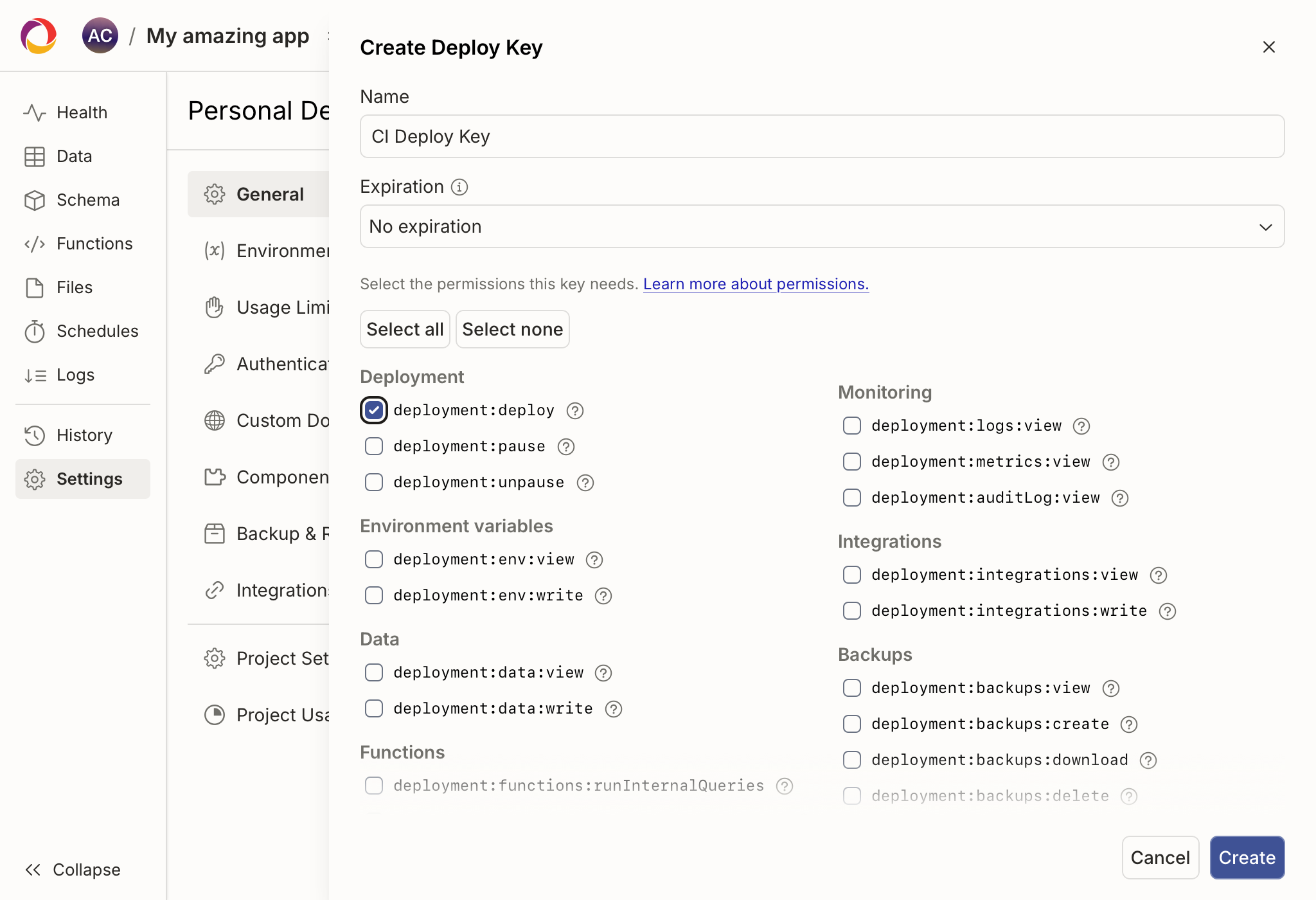
To delete a key, find it in the Deploy keys list and use its delete action.
From the CLI
You can also mint and revoke deploy keys with npx convex deployment token.
This is useful in setup scripts (e.g. for a coding agent) where you want a
deploy key scoped to a single deployment without having to click around the
dashboard.
You must be logged in with a personal access token (npx convex login) — these
commands cannot be invoked with a CONVEX_DEPLOY_KEY already in scope.
npx convex deployment token create
npx convex deployment token create <name> [--deployment <ref>] [--save-env [path]]
<name>— required. A human-readable name for the new key (shown in the dashboard's deploy keys list).--deployment <ref>— optional. The target deployment. Accepts a deployment name (joyful-capybara-123), a reference (dev/james,staging), ordev/prod/local. Defaults to the currently-selected deployment.--save-env [path]— optional. Save the new key asCONVEX_DEPLOY_KEYin an env file instead of printing it. Defaults to.env.local. Pass an explicit path to write somewhere else.
By default the new deploy key is printed to stdout (status messages go to stderr, so you can pipe the key into another command):
KEY=$(npx convex deployment token create my-token)
With --save-env, the key is written into .env.local (or the path you
provide) as CONVEX_DEPLOY_KEY. Subsequent npx convex commands run in that
directory will use it automatically and run only against that deployment.
npx convex deployment token delete
npx convex deployment token delete <nameOrToken> [--deployment <ref>]
<nameOrToken>— required. Either the human-readable name passed totoken create, or the deploy key value itself (e.g.'dev:joyful-capybara-123|ey...'). When passing the value, single-quote it so the shell doesn't consume the|and everything after it.--deployment <ref>— optional. The deployment the key belongs to. Defaults to the currently-selected deployment.