Audit Logging
For AI agents: see llms.txt for the complete documentation index. Markdown versions are available by adding .md to a page URL or requesting Accept: text/markdown.
Convex offers the ability to emit transactional, durable logs to a S3 bucket in
your own AWS account. This can be useful for when you need to audit log your
users' access to sensitive data. Furthermore, audit logging allows you use
dynamic log variables to log client IP, User-Agent, and other metadata that
is not usually available in a query context.
Audit logging requires a Convex Enterprise plan and is only available for dedicated (D1024 and D2048) deployments. Learn more about our plans or ask us about Convex for Enterprise.
API
Use log.audit(params) inside your Convex function to emit an audit log.
params can be any JSON-serializable object. params may also include dynamic
log variables as values. Dynamic log variables are JavaScript Symbols that get
resolved to a value after the function executes. The following dynamic variables
are currently available:
log.vars.ip- IP of client initiating the requestlog.vars.userAgent-User-Agentheader of client initiating the request. Note thatUser-Agentheaders that are too long (over 512 bytes) may be truncatedlog.vars.requestId- the request IDlog.vars.now- the timestamp of when the function was run or replayed from the cache, as milliseconds from the Unix epochlog.vars.convexActor- information about the admin, if the function was invoked using admin auth (either directly or while acting as an end user, e.g. from the dashboard), otherwisenull
import { log } from "convex/server";
import { v } from "convex/values";
import { mutation } from "./_generated/server";
import { internal } from "./_generated/api";

export const updateDocument = mutation({
  args: {
    userId: v.string(),
    orgId: v.string(),
    documentId: v.id("documents"),
  },
  handler: async (ctx, { userId, orgId, documentId }) => {
    const document = await ctx.db.get("documents", documentId);

    const identity = await ctx.auth.getUserIdentity();
    const { name: deploymentName } = await ctx.meta.getDeploymentMetadata();
    const { name: functionName } = await ctx.meta.getFunctionMetadata();

    await log.audit({
      action: "document.viewed",
      actor: { userId, authUserId: identity?.sub },
      source: {
        ip: log.vars.ip,
        userAgent: log.vars.userAgent,
        deploymentName,
        functionName,
      },
      fields: {
        documentId,
        orgId,
        deploymentName,
        functionName,
      },
    });

    // These are available in code in mutations & actions,
    // so you can pass them along across scheduler boundaries, etc.
    // For queries, they will be available in logs but not in code.
    const { ip, userAgent, requestId } = await ctx.meta.getRequestMetadata();
    await ctx.scheduler.runAfter(0, internal.foo.bar, {
      requestMetadata: {
        ip,
        userAgent,
        requestId,
      },
      documentId,
    });

    return document;
  },
});
The resulting log body will be serialized to JSON, with log.vars values
replaced:
{
  "action": "document.viewed",
  "actor": {
    "userId": "...",
    "authUserId": "..."
  },
  "source": {
    "ip": "...",
    // ...
  },
  "fields": {
    // ...
  }
}
To automatically include the same metadata fields in the logs, you can wrap
ctx in a custom function that
provides a helper function for audit logging.
Guarantees
Audit logs have stronger guarantees than regular logging with console.log.
Audit logs will be emitted:
- Every time a query result is streamed to any subscriber (including query cache
hits)
- Cached queries will replay audit logs with updated timestamp, IP, and user agent
- On mutations, both on success and failure, and possibly on OCC retries
- Function commit will block on log persistence.
Any queries or mutations called in an action (using ctx.runMutation or
ctx.runQuery for example) will emit audit logs according to the guarantees
above. Calling log.audit directly in an action is not yet supported; it will
throw an error.
Limits
- Each function execution can log at most 4MB of audit logs, at most 500 audit logs, and at most 1MB per log. Audit logs in nested function calls count towards the parent function's limit. If a function exceeds the limits, it will fail. We suggest keeping audit logs under 10 KB to reduce latency.
ipanduserAgentis not available in the audit logs for crons or scheduled functions. However, mutations and actions can access them viactx.meta.getRequestMetadataso they can pass it as an argument to the scheduled function, if desired.- Auth identity should be manually specified in your log bodies. Per usual, auth is not accessible in scheduled functions, crons, or in components. This implies passing the actor in as an argument to component functions. We may add auth capabilities for components in the future.
- The current code version is not directly available. As a workaround, you can update code or set an environment variable with a version identifier, such as a git hash.
- We may log events when a transaction ends up rolling back due to conflicts, or if the transaction fails otherwise. Delivery is at least once.
- There will be a delay between when an audit log is emitted and when it is delivered to your destination S3 bucket.
Billing
Audit logs are rounded up to the nearest 5KB when calculating bandwidth for billing. See more information about billing on our pricing page.
Development
While developing, you can enable the custom_audit topic on a configured
log stream to see your
audit logs without setting up S3 delivery. To do so, select custom_audit in
the “Topics” section of the log stream configuration.
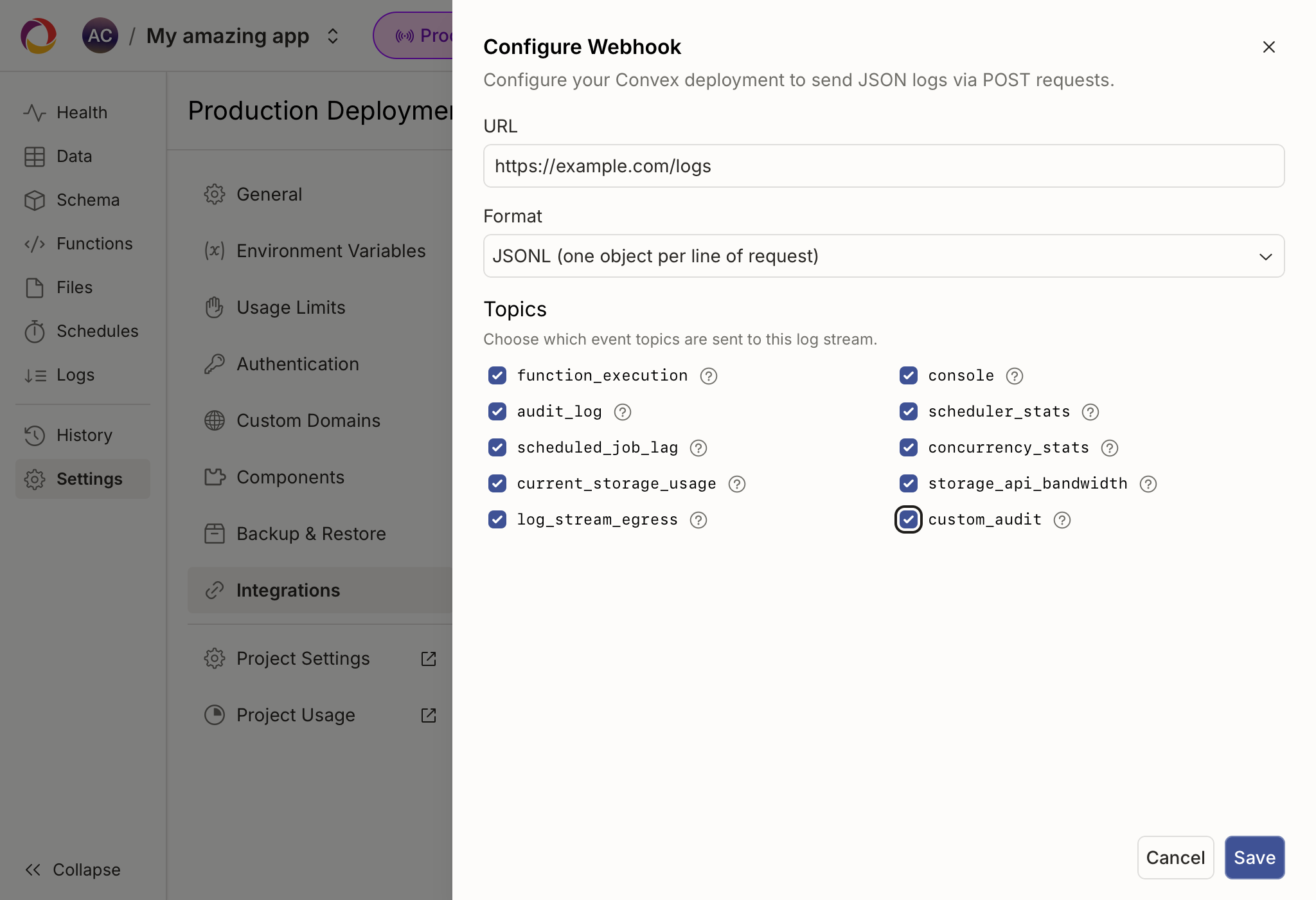
The custom_audit topic is intended for testing. custom_audit logs sent
through a log stream do not share the same durability guarantees as S3 delivery,
and are billed the same as other
log streams.
Configuration
Contact Convex Support to configure your S3 bucket for audit logging. Note that audit logging is only available for dedicated (D1024 and D2048) deployments.
If no S3 bucket or log stream is configured, no logs will be emitted, but the audit log size limits will still be enforced.